I’ve been experimenting with the OpenAI text-embedding-3-large model through the API, and interestingly, it’s returning 1536-dimensional embeddings for my text inputs — and they work great so far!
Right now, I’m building a word-to-embedding dictionary and planning to store it in Pinecone as a vector database. However, when I try to configure the Pinecone index, I only see dimension options for 256, 1024, and 3072 — there doesn’t seem to be an option to explicitly set 1536.
My question is:
“Is there a way to manually create a Pinecone index with 1536 dimensions for this model?
I’d really prefer to keep my vectors as-is (1536 dims) without needing to pad or project them, since that might distort semantic similarity.
Any guidance from the Pinecone or OpenAI team — or anyone who has tried using custom dimensions with text-embedding-3-large — would be super helpful
Absolutely and that is a very popular model. Pinecone can support any dimension up to 20,000. I suspect what you’re seeing is for our integrated embedding indexes pre-configured to use our hosted embedding models.
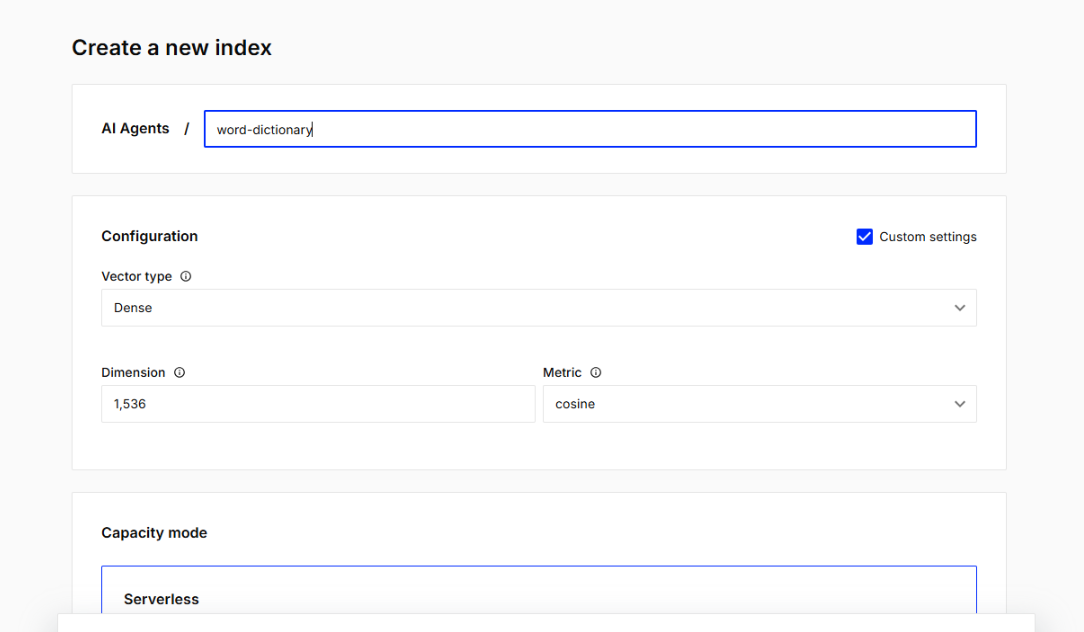
You can click on Custom Settings in the corner and specify the exact dimension and other settings you want.
I just tried creating the index using “Custom Settings”, and this time I was able to manually set the dimension to 1536, which matches the embeddings I’m getting from text-embedding-3-large.
However, I noticed that when I use Custom Settings, I no longer see any option to select or link the embedding model directly (e.g. text-embedding-3-large).
Here’s a screenshot of the configuration screen — as you can see, it lets me enter the dimension and metric, but there’s no place to choose the model.
Could you please clarify how to properly configure both the embedding model and dimension together? Should I manually generate embeddings via the OpenAI API and then upsert them into Pinecone?
Thanks again for your guidance — really appreciate your time and support!
For indexes with custom settings, we don’t currently require you (or allow you) to specify the model in the index configuration, and it has no affect on the quality or performance of the index.
You will need to generate embeddings directly from OpenAI and then upsert them to Pinecone. (You’ll need to do the same when querying the index.)
Note, we have considered extending our integrated text API (where we produce the embeddings for you) to support popular 3rd party models such as text-3-large, so I will note your request as another vote in favor of doing that!
It’s great to hear you’re considering adding support for external models like text-embedding-3-large in the integrated text API — that would be incredibly useful for projects like mine.
Really appreciate the detailed explanation and your help throughout this process!